I'm always excited to take on new projects and collaborate with innovative minds.

Email

contact@niteshsynergy.com

Website

https://www.niteshsynergy.com/

Splunk

1. Splunk Introduction (Beginner)

What is Splunk

Splunk is a machine data analytics platform used to collect, index, search, and visualize large volumes of log data.

Organizations use Splunk to monitor:

  • Applications
  • Servers
  • Security events
  • Network devices
  • IoT systems

Key Functions

  1. Collect Data
  2. Index Data
  3. Search Data
  4. Analyze Data
  5. Visualize Data

2. Splunk Products

1. Splunk Enterprise

  • On-premise platform
  • Full features

2. Splunk Cloud

  • SaaS version
  • Managed by Splunk

3. Splunk Light

  • Small scale log management

4. Splunk Enterprise Security (ES)

  • Security monitoring platform

5. Splunk ITSI

  • IT service monitoring


3. Splunk Architecture

 
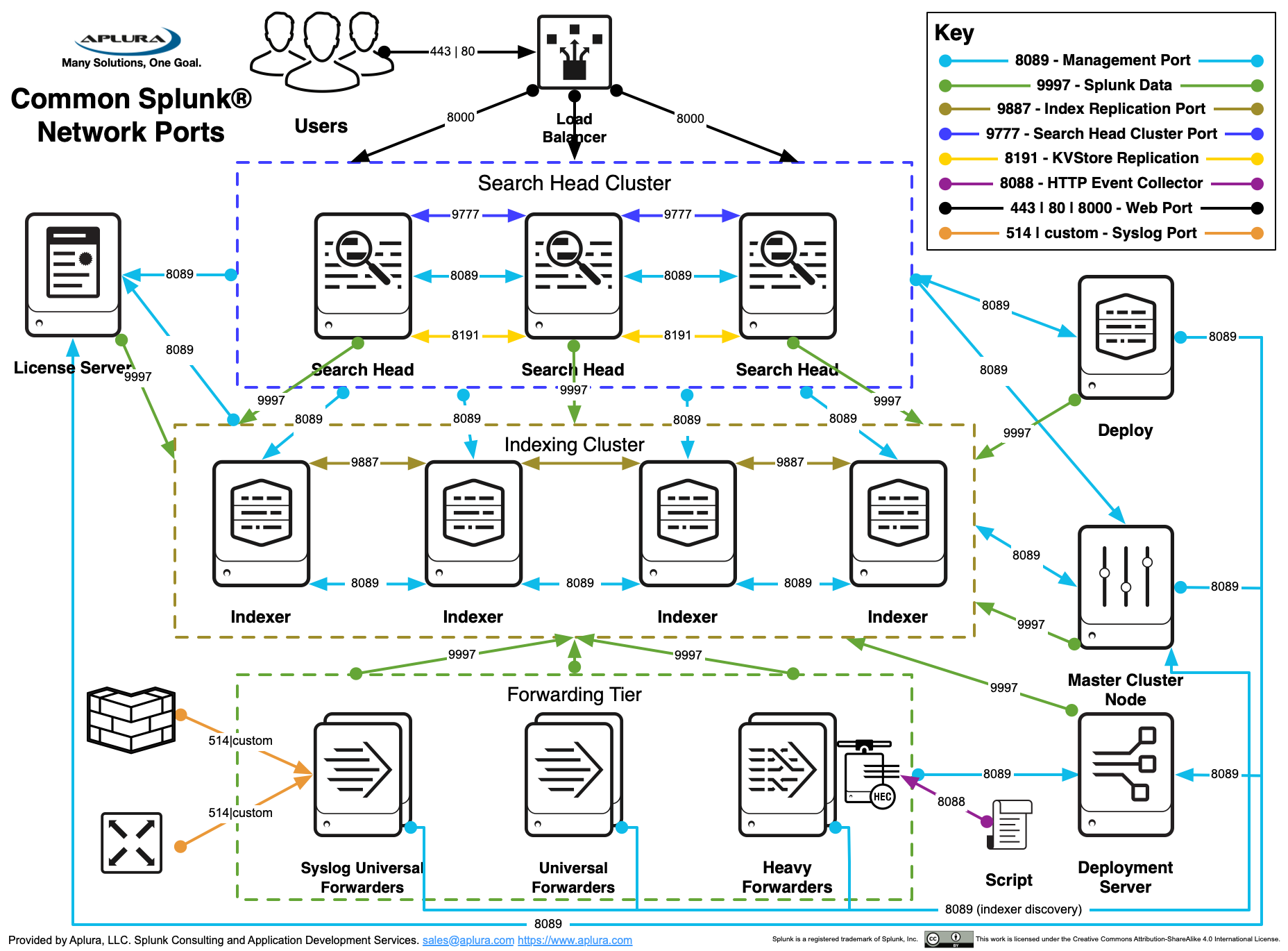
Splunk Architecture — Forwarder, Indexer & Search Head Tutorial | by  Aayushi Johari | Edureka | Medium


Splunk Best Practices - Aplura


Solved: Diagrams of how indexing works in the Splunk platf ...


Core Components

Forwarder

Collects logs and sends them to Splunk.

Types:

  • Universal Forwarder
  • Heavy Forwarder

Indexer

Stores indexed data and processes searches.

Search Head

Runs search queries and generates dashboards.

Deployment Server

Manages forwarders.

License Master

Controls license usage.


4. Splunk Installation

Requirements

  • Linux / Windows
  • Minimum 8GB RAM recommended

Installation Steps

  1. Download Splunk
  2. Install package
  3. Start Splunk

Command:

 
./splunk start
 

Web Interface

 
http://localhost:8000
 

5. Data Ingestion

Splunk collects data from multiple sources.

Types of Inputs

Input TypeExample
File monitoring/var/log/syslog
Network dataTCP / UDP
Scripted inputsPython scripts
APIsREST APIs
HTTP Event CollectorHEC

Example:

 
monitor:///var/log/apache/access.log
 

6. Source Types

Source types define format of data.

Examples:

  • syslog
  • apache_access
  • mysql_error
  • log4j

Purpose:

  • Proper timestamp detection
  • Field extraction
  • Event parsing

7. Splunk Indexes

Index is where Splunk stores data.

Default indexes:

IndexPurpose
maindefault logs
_internalSplunk internal logs
_auditaudit logs

Example index creation:

 
indexes.conf
 
 
[web_logs]
homePath = $SPLUNK_DB/web_logs/db
 

8. Search Processing Language (SPL)

SPL is used to search data.

Basic syntax:

 
search term | command
 

Example:

 
error | stats count
 

9. SPL Commands (Important)

Filtering

 
index=web_logs status=500
 

Stats Command

 
| stats count by host
 

Chart Command

 
| chart count by status
 

Timechart

 
| timechart count
 

Top Command

 
| top host
 

Sort

 
| sort -count


10. Fields in Splunk

Fields are extracted from events.

Examples:

  • host
  • source
  • sourcetype
  • timestamp

Field Extraction

 
props.conf
transforms.conf
 

Example:

 
EXTRACT-user = user=(?<user>\w+)


11. Knowledge Objects

Knowledge objects enrich data.

Types:

  • Fields
  • Tags
  • Event Types
  • Lookups
  • Macros
  • Workflows
  • Reports
  • Dashboards


12. Lookups

Lookups add extra data.

Example:

IPCountry
1.1.1.1USA
2.2.2.2India

Example SPL:

 
| lookup ip_location ip OUTPUT country


13. Reports

Reports are saved searches.

Example:

Daily error report.

Features:

  • Scheduled execution
  • Shareable
  • Exportable


14. Dashboards

Dashboards display visual data.

Elements:

  • Charts
  • Tables
  • Maps
  • Metrics

Example panel query:

 
index=web_logs | stats count by status
 

15. Alerts

Alerts trigger actions based on conditions.

Example:

 
error count > 50
 

Alert actions:

  • Email
  • Webhook
  • Script

16. Data Models

Data models organize data for analysis.

Used mainly for:

  • Security analytics
  • Accelerated searches

Components:

  • Datasets
  • Constraints
  • Fields

17. Pivot

Pivot allows drag-and-drop analysis.

Benefits:

  • No SPL required
  • Fast reporting

18. Splunk Apps

Apps extend Splunk functionality.

Examples:

  • Splunk Enterprise Security
  • Splunk IT Service Intelligence
  • Splunk DB Connect
  • AWS monitoring app

19. Splunk Configuration Files (Important)

Splunk uses configuration files.

Key files:

 
inputs.conf
outputs.conf
props.conf
transforms.conf
indexes.conf
limits.conf
server.conf
authentication.conf
 

Example:

 
inputs.conf
 
 
[monitor:///var/log/messages]
index=syslog
sourcetype=syslog
 

20. Parsing Pipeline

Data processing stages:

 
Input

Parsing

Indexing

Search
 

Parsing steps:

  1. Line breaking
  2. Timestamp detection
  3. Event creation
  4. Field extraction


21. Indexer Clustering (Advanced)

https://splunk.deploy.heretto.com/v4/deployments/lbx3FHoDR4kUISPo5g64/object/a565663e-9a71-432c-90f3-b3f636a0853d?jwt=eyJ0eXAiOiJKV1QiLCJhbGciOiJIUzI1NiJ9.eyJodHRwczovL2pvcnNlay5jb20vZXpkX29yZ2FuaXphdGlvbiI6InNwbHVuayIsImh0dHBzOi8vam9yc2VrLmNvbS9lemQvb2JqZWN0X3V1aWQiOiJhNTY1NjYzZS05YTcxLTQzMmMtOTBmMy1iM2Y2MzZhMDg1M2QiLCJleHAiOjE3NzQ3MTY5NDgsImp0aSI6IjczNjllN2VhMzBhZDQ5ZWI4MDg5YmRmYzA4ZmU5ZjMxIiwiaHR0cHM6Ly9qb3JzZWsuY29tL2V6ZF9maWxlc2V0IjoiWkRQNmJ0WHlTMXRZYnZsVk9yM0IifQ.5soyQ3oMIZ0IB4Sx2BJQrio2HYO7yD4UcTw8qS_GYbg
https://media.licdn.com/dms/image/v2/D4D12AQFeZCDYCQ6QFA/article-cover_image-shrink_720_1280/article-cover_image-shrink_720_1280/0/1684915531448?e=2147483647&t=S6CSrUWi01T0JToV74HBXu5KbstL6KVCXH95yNeKKk8&v=beta
https://splunk.deploy.heretto.com/v4/deployments/lbx3FHoDR4kUISPo5g64/object/2090405a-9773-48e2-a00d-321b1368f951?jwt=eyJ0eXAiOiJKV1QiLCJhbGciOiJIUzI1NiJ9.eyJodHRwczovL2pvcnNlay5jb20vZXpkX29yZ2FuaXphdGlvbiI6InNwbHVuayIsImh0dHBzOi8vam9yc2VrLmNvbS9lemQvb2JqZWN0X3V1aWQiOiIyMDkwNDA1YS05NzczLTQ4ZTItYTAwZC0zMjFiMTM2OGY5NTEiLCJleHAiOjE3NzUyNDM0ODMsImp0aSI6IjY2MTI1MTE2MDgwNzRhNzBiY2FmYWE2YWE4ZjA3Y2ViIiwiaHR0cHM6Ly9qb3JzZWsuY29tL2V6ZF9maWxlc2V0IjoibUZXeU5JQVZPWE41b3dSd2xEZVMifQ.PsxlsKVttHtsc2GFnT4fFF8Khh4omVfdmboM9jDf4fM

Purpose:

  • High availability
  • Data redundancy

Components:

  • Cluster Master
  • Peer Nodes

Key parameters:

 
Replication Factor (RF)
Search Factor (SF)
 

Example:

 
RF = 3
SF = 2
 

22. Search Head Clustering

Multiple search heads working together.

Components:

  • Captain node
  • Member nodes
  • Deployer

Benefits:

  • Load balancing
  • High availability

23. Deployment Server

Manages configuration of forwarders.

Example tasks:

  • Push apps
  • Update configurations
  • Manage thousands of servers

24. Splunk Security

Security features:

  • Role based access
  • Authentication
  • SSL encryption
  • Audit logs

Roles example:

  • admin
  • power user
  • user

25. Performance Optimization

Important for large environments.

Techniques:

  • Limit search time
  • Use indexes
  • Use summary indexing
  • Use accelerated data models

26. Monitoring Splunk

Monitoring tools:

 
index=_internal
 

Example query:

 
index=_internal source=*metrics.log
 

Used for:

  • performance monitoring
  • troubleshooting

27. Splunk Troubleshooting

Common issues:

Forwarder not sending logs

Check:

 
splunk list forward-server
 

Index full

Check:

 
df -h
 

License exceeded

Check:

 
license usage
 

28. Summary Indexing

Stores summarized data for faster searches.

Example:

Daily traffic summary.

Benefits:

  • Faster dashboards
  • Reduced load

29. HTTP Event Collector (HEC)

Allows sending logs via HTTP.

Example:

 
POST /services/collector
 

Used for:

  • cloud applications
  • microservices
  • APIs

30. Real Enterprise Use Cases

Splunk is used for:

Security Monitoring

Detect cyber attacks.

IT Operations

Monitor servers and apps.

Business Analytics

Customer behavior analysis.

DevOps

Application monitoring.